eAlerts
-
ICD-10-CM and Anesthesia Compliance Webinar
Exclusive for Anesthesia Business Consultants' Clients
ICD-10 is Here. This radical change in the way diagnosis and medical necessity is documented will have a profound impact on each and every anesthesia practice. This change is not something that ABC can resolve for our clients in a vacuum. There are many dimensions and implications to the implementation of such a significant change in the claims adjudication process that will affect clinical documentation requirements, the relationship between anesthesia providers and surgeons and even practice cashflow.
While there is much that we do know, and which we are eager to share with you, there is also much that we do not know. Forewarned is forearmed. We must all prepare for the transition and engage in some serious strategic planning.
This ABC webinar will explain the changes and give you some general guidance for the new documentation standards that will be required. These carefully planned sessions are a critical step for you to understand and appreciate the significance and implications of a much closer focus on and review of diagnostic documentation.
Our comprehensive agenda includes:
- What is ICD-10?
- How firm is the new target date?
- Do the surgical and anesthesia diagnoses need to match?
- What are the implications of ICD-10 with regard to anesthesia documentation?
- How does diagnosis coding work?
- What are the primary areas of concern?
- Who is responsible for an accurate diagnosis?
- Practical Suggestions.
-
Practice Analysis Successfully Submitted!
Thank you for your interest! Your contact information was submitted successfully. We will respond to your inquiry within two business days.
-
Patient Payment Information
ABC offers the following patient bill payment options:
- Mail in your payment with your statement – statements are sent every month.
- Call our patient’s accounts line 800-222-1442 to speak to a customer service representative who can set up payment arrangements ie; payment plans, take credit card payments during the hours of 8am – 7pm eastern standard time.
- Call our 800-222-1442 to make a credit card payment through our automated phone system (voice recognition system) 24 hours/7 days a week.
- You may also make your payment online at: https://paynow.coronisglobal.com/
- Email us at customer.service@anesthesiallc.com
-
Style Guide
This is a Title
Created using : <h3> tag
This is a test paragraph. Just to fill some content here. This is not relevant. There is no need to really read any further. Well if you really have time, alright then read on.
This is a Subtitle
Created using : <h4> tag
This is a test paragraph. Just to fill some content here. This is not relevant. There is no need to really read any further. Well if you really have time, alright then read on.
List without bullets / numbers
Created using : <ul> tag
- List 1
- List 2
- List 3
Bullet List
Created using : <ul class = "list"> tag
- List 1
- List 2
- List 3
2 Tier Bullet List
Created using : <ul class = "list"><li>List 1 <ul class="sublist"> <li>Sub item 1</li> <li>Sub item 2</li> </ul> </li> <li>List 2</li> <li>List 3</li></ul>
- List 1
- Sub item 1
- Sub item 2
- List 2
- List 3
Numbered List
Created using : <ol class = "decimal"> tag
- List 1
- List 2
- List 3
Big Alphabets List
Created using : <ol class = "bigalpha"> tag
- This is subitem 1
- This is subitem 2
- This is subitem 3
Small Alphabets List
Created using : <ol class = "smallalpha"> tag
- This is subitem 1
- This is subitem 2
- This is subitem 3
Big Roman List
Created using : <ol class = "bigroman"> tag
- This is subitem 1
- This is subitem 2
- This is subitem 3
Small Roman List
Created using : <ol class = "smallroman"> tag
- This is subitem 1
- This is subitem 2
- This is subitem 3
Table
Created using : <table class = "article"> tag
Heading 1 Heading 2 Row 1 / Column 1 Row 1 / Column 2 Row 2 / Column 1 Row 2 / Column 2
Trademark™
Created using : ™
This is how to create a trademark - ABC™
Registered Symbol
Created using : ®
This is how to create a registered symbol - ABC®
Link open in new tab
Created using : <a href = "http://www.anesthesiallc.com" target = "_blank">ABC Site </a>
This link opens in a new tab : ABC Site
Creating Download PDF button
<ul class="demo-links">
<li class="download-broucher"><a href="/images/brochures/ABCs FirstAnalytics.pdf" target="_blank">Download a Brochure</a></li>
</ul>
Events display on 2 lines
Add the address using HTML editor
<p class="events">Ambulatory Surgery Centers 21st Annual Conference, Chicago, IL</p>
Summary box
Created using : <div class="summary">
SUMMARY
This is a test paragraph. Just to fill some content here. This is not relevant. There is no need to really read any further. Well if you really have time, alright then read on.
Adding Images
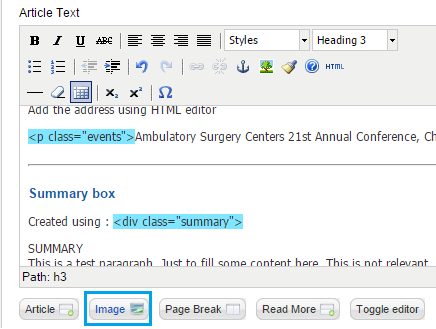
Step 1 : Click on the image button as shown below

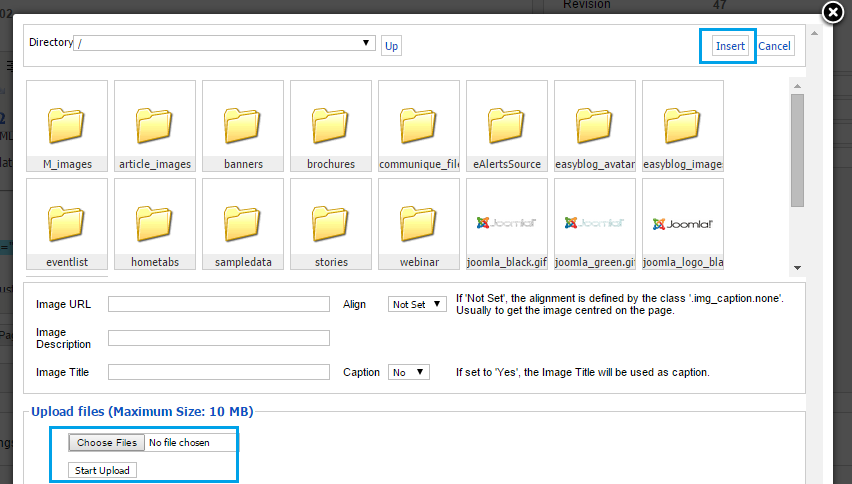
Step 2 : You can either choose an existing image or use the browse button at the bottom to upload a new image and then insert it.